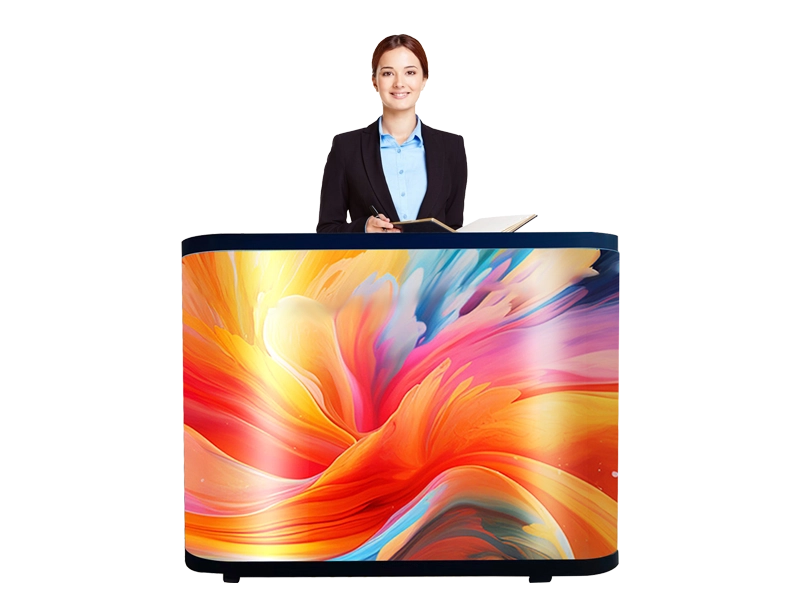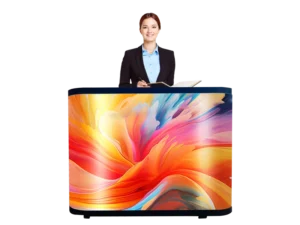
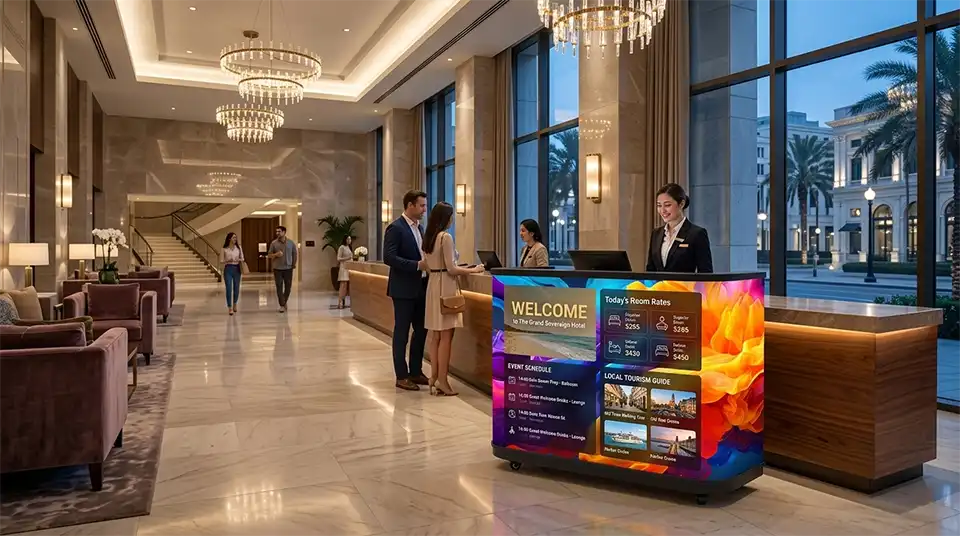
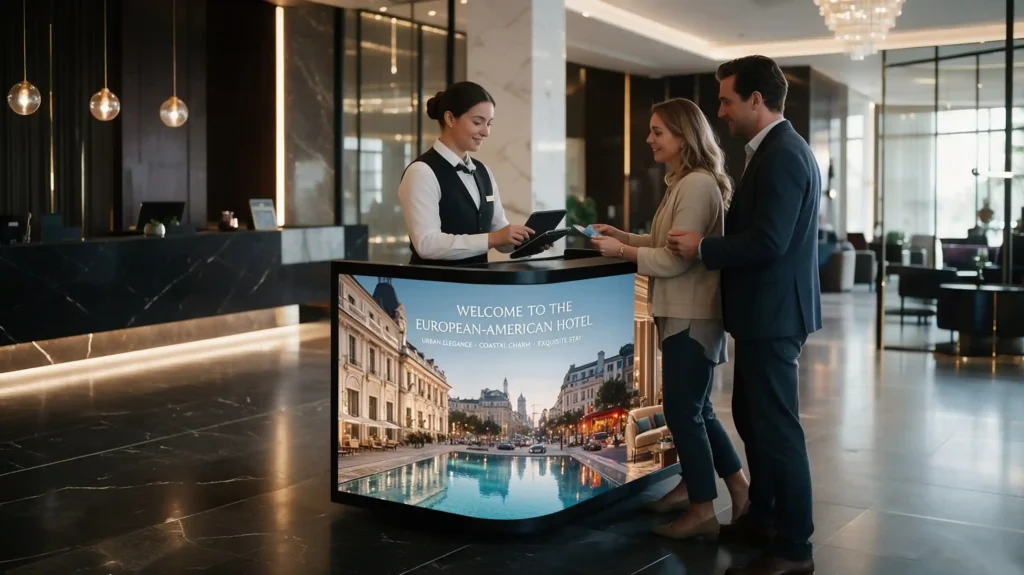
A curved LED reception desk integrates a hotel reception LED display into the front of the check-in counter rather than mounting it on the wall behind. Hotels can use it to present welcome messages, brand visuals, meeting information, dining promotions and multilingual guest notices at the point of check-in. Whether it is a suitable investment depends on viewing distance, lobby lighting, content requirements, maintenance access and total project cost: the display makes information more visible and easier to update, but it does not by itself guarantee higher guest satisfaction or revenue.
Why Do Hotels Use LED Reception Counters for Branding and Guest Information?
Because the reception counter is the one point in a lobby where a guest stands still and faces the same surface for a minute or more.
- The position does the work. A guest at the counter has nothing else to read.
- It adds no new footprint. A wall screen needs wall area; a freestanding kiosk needs floor space.
- The first use case is operational. Breakfast hours, Wi-Fi, luggage storage, transport and meeting-room locations are asked all day, and answering them before a guest reaches the desk removes a question rather than adding a message.
- What should not be claimed. Displaying content does not by itself raise occupancy, guest satisfaction or revenue.
Hotels may consider integrated LED reception counters when they need a flexible way to present welcome messages, event information and brand content. The business case depends on the property’s layout, content-update frequency, operating requirements, budget and the reading distance the counter offers. Broader digital signage trends give useful context, but they do not by themselves establish demand or return on investment for hotel reception displays.
Adhaiwell’s range includes a curved LED reception desk built for this position.
Where Does a Curved LED Reception Desk Work Best in a Hotel?
As a primary or secondary counter in a controlled-light lobby, and in pop-up settings where the counter itself can move. A direct-sun location needs its own brightness and environmental assessment — this indoor counter should not be assumed suitable for it — and the same applies where the guest side falls inside a splash or wash-down zone.
| Scenario | Position | Reading distance to design for | Display and content implications |
|---|---|---|---|
| Main check-in counter | Front face, guest side | 1.5–3 m in the queue; 0.8–1.2 m at the counter | P1.86 or finer as a candidate; the heaviest content-ownership burden |
| Concierge or information point | Side return, or a second face | 1–2 m | P1.25–P1.53 for close reading, subject to a content sample |
| Meeting and event registration | Function desk facing the pre-function area | 2–5 m | P2.5 may be adequate; the edit path must handle same-day room changes |
| Restaurant, bar and spa promotion | Same counter face, a dedicated zone | 1.5–3 m | Split-screen zone with dayparted scheduling; F&B or spa owns accuracy |
| Multilingual guest assistance | Counter face, optionally a staff-side panel | 1–2 m guest side; 0.6–0.8 m staff side | Language strategy to be tested: per-language display time, type size and rotation cycle |
| Pop-up reception, ballroom registration, trade show | Mobile counter on castors, flight case | 1.5–3 m | Floor protection, threshold and lift clearance, a dedicated circuit, no permanent cabling |
The distances and pitch figures above are early-stage design references, not enforced standards. Readability also depends on font size, contrast, layout, screen height and light on the surface. Published brightness tops out at 800 nits, which suits a controlled-light interior, so a window-facing position needs its own assessment, and IP43 is a defined classification under specified test conditions rather than a general-purpose seal.
How Should Hotels Choose Pixel Pitch, Brightness and Curvature?
All three are manufacturing inputs rather than on-site adjustments: pitch follows the nearest real reading distance, brightness follows the light falling on the surface, and the radius and the module map are fixed at design stage.
Pixel pitch follows the reading distance
P1.86 is a common candidate for a hotel check-in counter; finer pitch is chosen where guests read detail standing at the counter. Adhaiwell’s published guidance sets minimum viewing distance at pixel pitch (mm) × 0.8 m for 4K content, recommended at pitch × 1.5–2.5 and maximum at pitch × 10, which puts P1.86 at roughly 1.5 m. Treat it as planning guidance, not a guarantee: readability also depends on font size, contrast and ambient light, and the product page also describes viewing from around 1 m, so the two should not be quoted as one number. Approve the pitch on a full-size content sample at the real distance; Adhaiwell’s pixel pitch and nits explained guide covers the relationships.
Brightness is a site condition, not a spec-sheet contest
The published 600–800 nit band positions this counter for a shaded, controlled-light lobby. Published brightness is 600 nits at P1.25 and P1.53, 700 at P1.86 and 800 at P2.5, against the manufacturer’s own published indoor bands of 800–1,500 nits for indoor retail and 600–800 for studio and control-room work. Ratings are measured under defined conditions and say nothing about daylight on the surface or reflection from a window, so check the position from the guest’s standing point and specify daypart dimming.
Curve radius, module map and screen area are fixed at design stage
Curved geometry has to be locked before the joinery is built, because the radius, the module map and the seam positions are manufacturing inputs. The manufacturer publishes R500 as a minimum bend radius, and the counter measures 1,675 × 585 × 1,100 mm with an LED area of 2,560 × 960 mm, described as an 800 mm main band plus a 160 mm secondary band — wider than the counter body, consistent with a wrap around the returns. A published radius can belong to a module family rather than to every build, and the wrap is an inference until the mechanical drawing confirms it, so get the drawing and the module and seam map at quotation stage and place seams on quiet areas of the artwork. Adhaiwell’s curved versus flat LED cabinet geometry article compares the trade-offs.
What Should Designers Check Before Installation?
Three checks decide whether the installation still works in year three: what front access actually covers, the structural and electrical load, and the staff side of the counter together with access requirements.
What does “front access” actually cover?
Front access matters only if every serviceable part is reachable from the guest side. The counter is specified as 100% front service, with a module removed from the front in about two minutes using a magnetic tool, but a blanket statement may cover the LED modules only: power supplies, receiving cards, the media player and cabling can sit inside a sealed base. Ask for a written scope naming each part, its access side and the tool required, and keep a spare module on site.
Floor loading, power and heat
Weight, point load, power and heat belong in the structural and MEP drawings before the counter is ordered. The counter is specified at 130 kg, with published power ratings of 800 W/m² maximum and 200–300 W/m² average; applied to the 2.56 × 0.96 m display area that is roughly 1,970 W at maximum and 490–740 W at average. The maximum is arithmetic on the manufacturer’s rating for that display area — a theoretical upper bound, not a measured running load — so confirm whether it covers the display alone or the whole counter, and have a qualified electrician size the circuit from the equipment nameplate and the local code. Fanless construction removes fan servicing but makes the counter cavity the thermal envelope, so the ventilation path in the joinery has to be designed.
The staff side, and access requirements
A reception counter is a workplace before it is a screen, and a screen on its front face does not remove the need for an accessible service-counter section. Check the worktop depth and height the front-office team will use, where the operator’s monitor sits relative to the LED face, and whether the 585 mm cavity leaves clearance for legs, cabling and the media player. Access scope turns on three questions: does the project need an accessible service-counter section under the applicable standard; does the display or counter structure affect circulation, approach or face-to-face contact; and does a local architect need to confirm which rules apply — for most international projects, yes. The 2010 ADA Standards cover clear floor space, knee and toe clearance, protruding objects and reach and force in §§305–309, but they are one national framework; other regions apply their own rules.

Which Content Works Best on a Hotel Reception LED Display?
Operational information with a genuine expiry time works best; brand content is the wrapper. The test for any item is whether a guest would act on it within the hour.
- Daily and hourly content is the priority tier. Arrival and departure times, breakfast, pool and spa hours, event room allocations, shuttle times, closures, weather, and returning-guest welcomes.
- Weekly content sits behind it. Restaurant specials, seasonal packages, local recommendations and upgrade offers, with dayparting letting one zone carry breakfast, lunch and bar content across the day.
- Language handling is a design decision to be tested, not assumed. A fixed language zone or a QR handoff avoids the problem of rotating several languages through a short loop, but the right answer depends on the property’s arrival mix: measure per-language display time and type size on the real surface before choosing.
- Nothing that needs sustained reading, and nothing static for years. Legal terms, long URLs and full price-point menus belong in a conversation or a leaflet. Video built for a flat 16:9 panel distorts at the returns, so content must be rendered to the geometry — the principle that also governs content rendered to a curved screen’s geometry on cylindrical displays — and rotating layouts avoids a permanently bright zone diverging in output beside a permanently dark one.
How Can Hotels Manage Content, Cleaning and Maintenance?
Content operations decide whether the screen still shows something worth reading; physical care decides whether it still works at all.
Content operations: who owns the screen?
Give the screen a named owner, a small template set, a publishing schedule and a restricted publishing list before it is installed.
- Name an owner and a backup per content type. Front office owns operational information, marketing the brand layer, F&B or spa its own promotions; a screen with no owner shows last season’s campaign.
- Issue templates, and give every message an expiry. A fixed set of layouts keeps type sizes and zone positions consistent, and expired content is the most visible failure on guest-facing screens.
- Provide two update paths. Network for scheduled updates and USB for offline or emergency use: scheduled playback, split-screen zones and offline USB fallback are the model Adhaiwell describes for its indoor signage range, covered in cloud content management for indoor signage.
- Respect the integration boundary. The counter ships with a built-in media player and USB or Wi-Fi updates — scheduled playback, not a property-management-system connector — so any live rate or availability display needs an interface the buyer scopes and tests separately.
Cleaning and maintenance: what to plan for
Plan an approved cleaning method, a realistic spares kit and a documented fallback for the day the screen is dark.
- Cleaning. The epoxy GOB coating is designed to be wiped: dry microfibre for routine dust, and a supplier-approved cleaner for marks; some solvents and abrasives may damage it. IP43 is a classification under defined test conditions, not a general-purpose seal, so where drinks or wet cleaning are likely, reassess the location rather than relying on the coating.
- A cleaning and inspection rhythm. Weekly, check the surface at a low-glare angle for fingerprints and brightness variation; quarterly, check the schedule against the events calendar and inspect the cavity cabling; annually, inspect connectors and the ventilation path and run a uniform grey-field test.
- Spare parts decide the downtime argument. One or two LED modules, a receiving card, a power supply and a media player cover most faults; without a spare module a single fault becomes a delivery-lead-time problem. Documents and the spare-parts route sit in Adhaiwell’s specification documents and technical support centre.
- Lifetime claims need their scope, not just a number. LM-80 data relates to the tested LED light source, not automatically to the complete display or counter, so ask which component a report covers; if an L70 estimate is offered, request the supporting calculation and read it with the warranty, service policy and spare-parts availability.
What Should Hotels Include in an LED Reception Display RFQ?
A brief that names the reading distance, the viewing position, the content owner and the service route prevents most change orders.
Site and geometry
- Floor plan showing counter position, guest approach route and queue line
- Measured reading distances — nearest guest, typical queue, longest sightline — using the worst case
- Photographs at midday and after dark with lobby lighting on
- Fixed or mobile counter; if mobile, threshold, door and lift clearances, floor finish, allowable point load
Display specification
- Target pixel pitch and the reading distance it was chosen for, confirmed against a full-size content sample
- Screen area, curve radius and the module and seam map, from the mechanical drawing of the quoted model
- Brightness and daypart dimming, with confirmation the position is out of direct sun
- IP rating reconciled against any “waterproof” wording, with the parts it covers identified
- Written maintenance scope: which parts are front-accessible, and the tools required
Power, data and services
- Worst-case and average power with the basis stated, heat load issued to the MEP schedule, and circuit capacity confirmed by a qualified electrician
- Cable route, isolation point and a labelled distribution board way
- Network point, or a documented offline USB workflow if there is none
Content, commercial and after-sales
- Content owner and backup per content type, plus template set, zone layout, playback schedule and message expiry rule
- Language list and rotation logic, with display time per language tested before go-live
- Integration boundary, and the fallback message when the feed stops
- Warranty term, exclusions, spare-parts kit contents, written service response time, and the documents available for the quoted configuration
How should the brief be evaluated against quotations?
Compare quotations on total cost of ownership rather than the headline number. The five documents that separate suppliers are the module and seam map on the mechanical drawing; the reconciliation between any waterproof claim and the stated IP rating, with the part it covers named; the test report and the component it covers; the spare-parts list; and the service response time. Add two project questions: who carries the interface between the counter and the joinery package, and what the commissioning and staff-training scope includes.
A China-based OEM/ODM manufacturer adds value at four points here, all answerable in documents rather than adjectives: module-level customisation to the counter’s geometry and radius, front-access mechanical design, pre-delivery ageing and calibration testing, and the spare-parts and documentation package. The published specification — pitch options, the 2,560 × 960 mm display area and the integrated counter layout — is set out on the GOB LED reception counter product page, which is the right starting point for a quotation.
Frequently Asked Questions About Hotel Reception LED Displays
These answers come from Adhaiwell’s experience manufacturing indoor and outdoor LED and LCD displays in Shenzhen for more than 15 years, supplying hotel, retail, transit and event projects through OEM and ODM channels.
What is a curved LED reception desk used for in a hotel?
It puts brand identity and guest information on the front of the check-in counter, the surface a guest faces while queuing and checking in. Typical uses are welcome messages, event information, dining promotions and multilingual notices; it is an information surface rather than a reservation or payment system unless a separate integration is scoped and tested.
Is a curved LED counter better than a wall-mounted screen behind reception?
Neither wins outright, and many lobbies end up with both. The counter wins on attention and footprint; wall-mounted displays may offer a lower cost per unit of display area in some installations, depending on mounting, structure and service requirements.
What pixel pitch does a hotel reception LED display need?
P1.86 is a common starting point for text read from roughly 1.5 m, and P1.25 or P1.53 gives more margin where guests read detail at the counter. Pitch is a planning decision rather than a fixed rule, because font size, contrast, layout and ambient light all affect readability, so confirm it on a full-size content sample.
Can it show live room rates or data from the property management system?
Only with an integration the buyer scopes and tests separately. The counter ships with a built-in media player and USB or Wi-Fi updates, which is scheduled playback rather than a system connector. Budget for the interface and specify a fallback message for when the feed stops.
How much power does it draw, and can it run continuously?
From the published ratings for the 2.56 × 0.96 m display area, average consumption is roughly 490–740 W and the maximum about 1,970 W — the maximum being arithmetic on the manufacturer’s rating rather than a measured load. Have a qualified electrician size the circuit, and rotate layouts and dim at night, because identical content for years can cause uneven ageing.
What happens when a module fails, and how long will the screen be dark?
Repair time depends on fault diagnosis, spare-part availability and access to the affected component, not on a single published figure. Documented front access shortens the physical swap, and a spare module on site removes the lead-time wait; without one, the same fault becomes a delivery-lead-time problem.