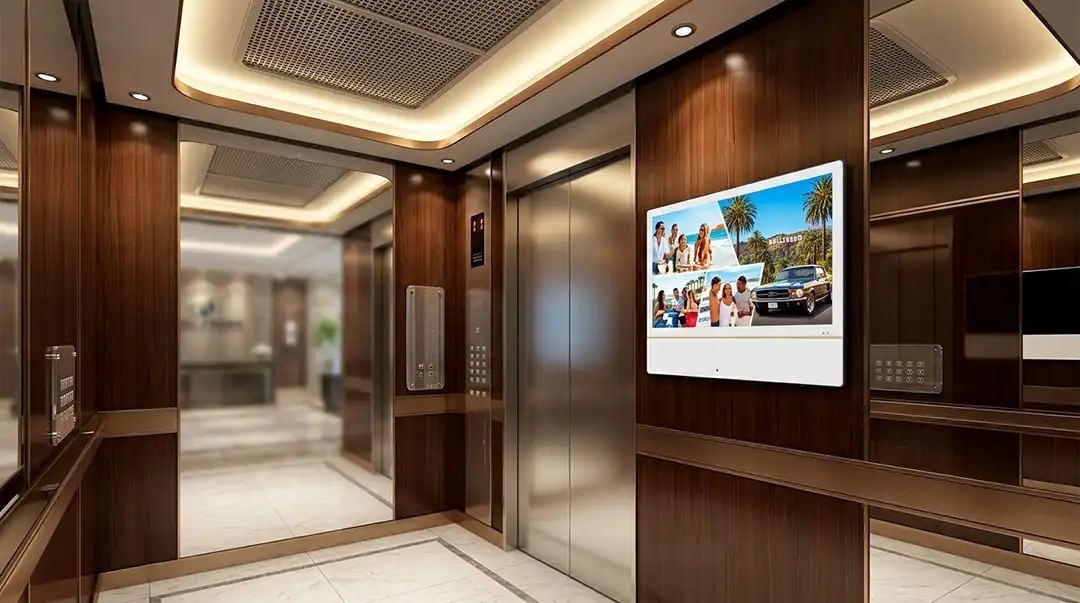
Elevator advertising is becoming more interesting to property owners, digital-out-of-home (DOOH) operators, and local advertising networks because elevator cabins provide a small, controlled environment where people often have time to notice a screen.
But choosing an elevator advertising display is not simply a matter of buying a 21.5-inch LCD panel.
For a commercial elevator digital signage project, buyers also need to consider the Android player, Cloud CMS, connectivity, offline playback, mounting, security, power, maintenance, installation, warranty, and the ability to manage more screens as the network grows.
This guide explains what buyers should look for when evaluating an Android elevator LCD digital signage display with Cloud CMS, particularly for residential apartments, hotels, office buildings, and elevator advertising networks.
What Is an Android Elevator LCD Digital Signage Display?
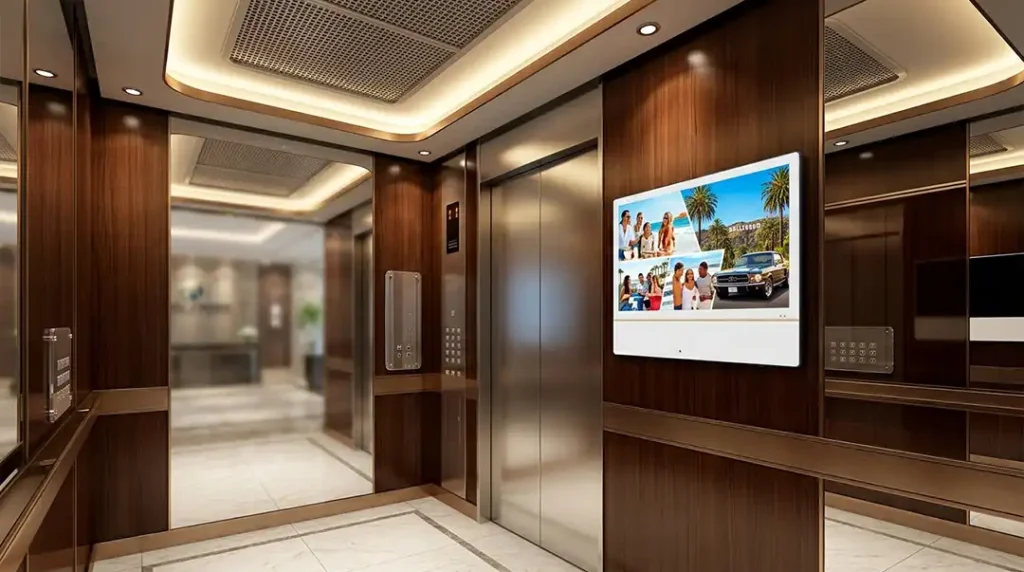
An Android elevator LCD digital signage display is a commercial display designed for installation inside elevator cabins or in elevator-related areas.
Unlike a conventional monitor that requires a separate computer or media player, an Android signage display can integrate the media player directly into the screen.
A typical system consists of four parts:
- Commercial LCD Display — the visual hardware passengers see.
- Embedded Android player — processes and plays digital content.
- Cloud CMS — allows operators to upload, schedule, and manage content remotely.
- Network connection — typically WiFi, Ethernet, or optional 4G.
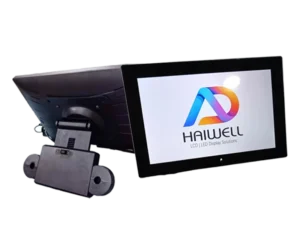
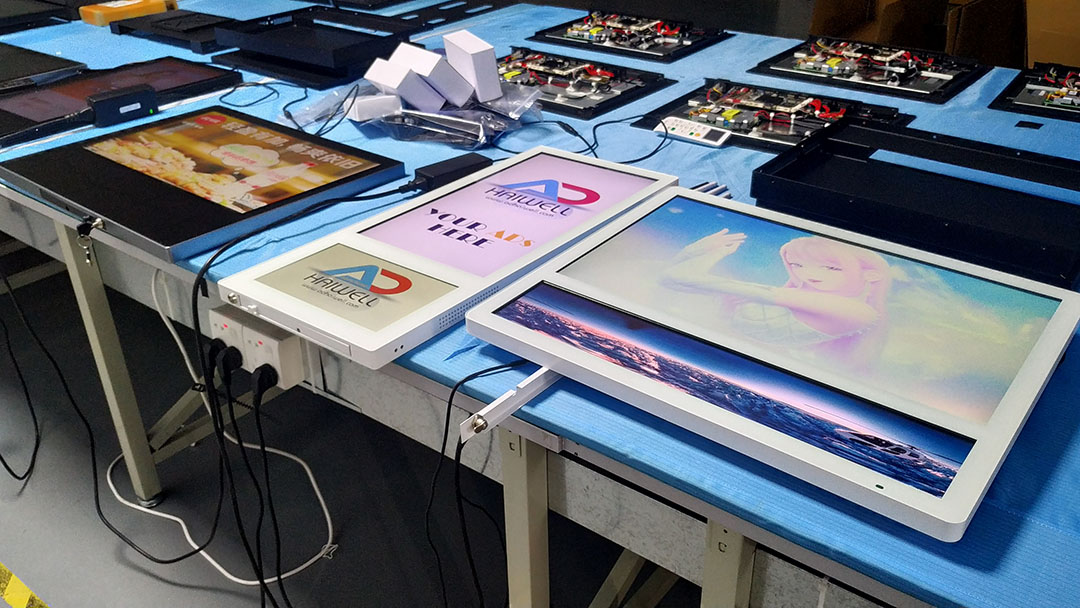
Adhaiwell’s elevator LCD digital signage range includes different screen sizes and portrait or landscape configurations for elevator advertising and building communication applications.
The important point for buyers is that an elevator screen should be evaluated as a complete signage system, not just as an LCD panel.
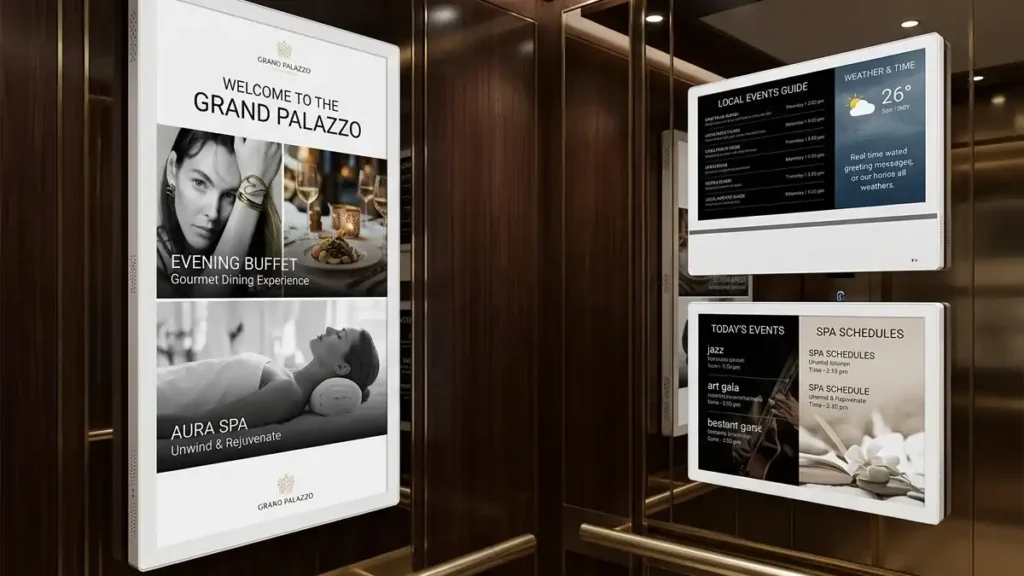
Why Use Android and Cloud CMS for Elevator Advertising?
A single elevator screen can be managed manually with a USB drive.
That approach becomes inconvenient when an advertising operator has ten, fifty, or several hundred screens installed in different buildings.
Cloud CMS changes the operating model.
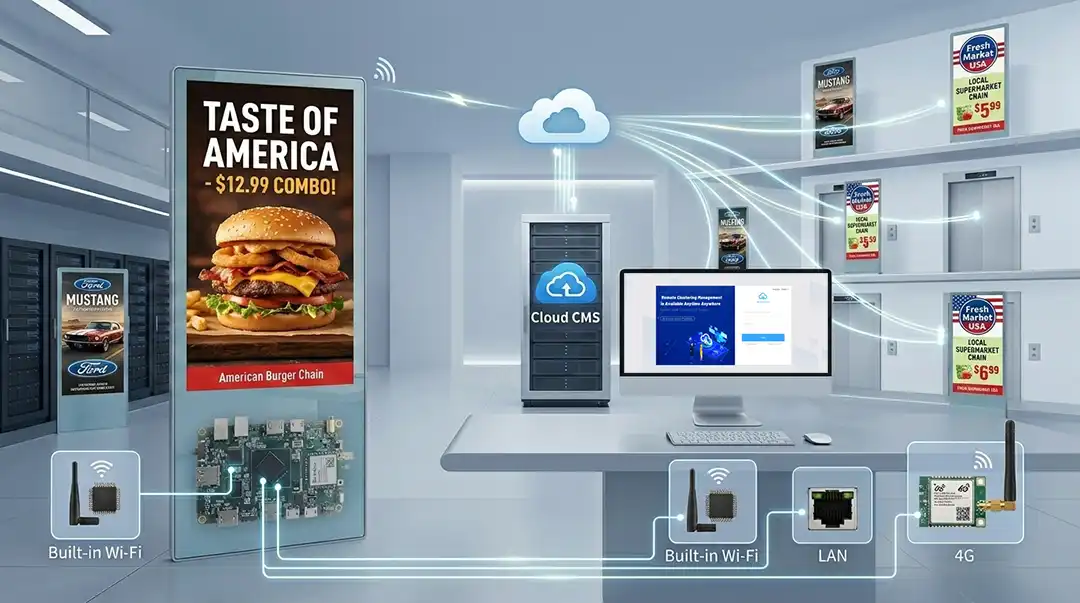
Instead of visiting every elevator, the operator can manage content centrally. A typical workflow looks like this:
Advertiser → Advertising Network → Cloud CMS → Elevator Screens
The operator can prepare advertising content, assign it to selected screens, create playlists, and schedule playback remotely.
For a growing elevator advertising network, this is important because the operational challenge changes as the number of screens increases.
Managing one screen manually is easy.
Managing hundreds of screens manually is not.
Cloud-based signage systems commonly use local content caching so that scheduled content can continue playing when a network connection is temporarily unavailable.
How Does Cloud CMS Manage Multiple Elevator Screens?
Cloud CMS allows a digital signage operator to manage screens from a central platform rather than treating each display as an independent device.
For an elevator advertising network, screens can potentially be organized by:
- Building
- Property
- Elevator
- Geographic area
- Advertising campaign
- Customer
- Screen group
For example, an advertising operator could create a campaign for ten apartment buildings and assign the same playlist to those locations.
A different campaign could be assigned to another group of buildings.
This becomes especially useful when an operator moves from a pilot installation to a larger commercial network.
A practical deployment process can be:
Pilot screen → installation validation → CMS validation → content testing → network validation → additional elevators → centralized management
This is one reason Cloud CMS is becoming a central part of commercial digital signage rather than an optional software feature.
Can Elevator Advertising Screens Continue Playing Without Internet?
Yes, provided the required advertising content has already been downloaded to the display.
The key distinction is between content playback and content management.
Once content is stored locally, the display can continue playing the existing advertising playlist even if the Internet connection is temporarily interrupted.
Internet access is primarily needed when the operator wants to:
- Upload new advertising content
- Change playlists
- Update schedules
- Manage devices remotely
- Synchronize new campaigns
This offline-playback approach is important for elevator advertising because a temporary WiFi or cellular outage should not automatically result in a blank screen.
The exact offline behavior depends on the CMS and player configuration, so buyers should test this function before deploying a large network.
Which Screen Size Is Best for Elevator Digital Signage?
There is no universal screen size for every elevator.
The right choice depends on:
- Elevator cabin dimensions
- Available wall area
- Viewing distance
- Portrait or landscape orientation
- Passenger traffic
- Content design
- Mounting location
- Local elevator requirements
Adhaiwell offers elevator LCD configurations including 15.6-inch, 18.5-inch, 21.5-inch, and 27-inch options, depending on the model and configuration.

For many standard elevator advertising applications, a 21.5-inch portrait display can provide a practical balance between visibility and physical footprint.
However, the final size should always be confirmed against the actual elevator cabin and installation location.
Why Is a 21.5-Inch Display a Practical Choice for Elevator Advertising?
A 21.5-inch screen is large enough to display advertising video, product images, promotional graphics, and building information while remaining relatively compact for an elevator environment.
Portrait orientation is particularly useful when the available wall space is vertically oriented.
A 21.5-inch elevator screen can be used for content such as:
- Local business advertising
- Apartment community promotions
- Restaurant advertising
- Hotel services
- Property announcements
- Event information
- Building notices
- News and information
- Community messages
The best screen size is therefore not necessarily the largest screen available.
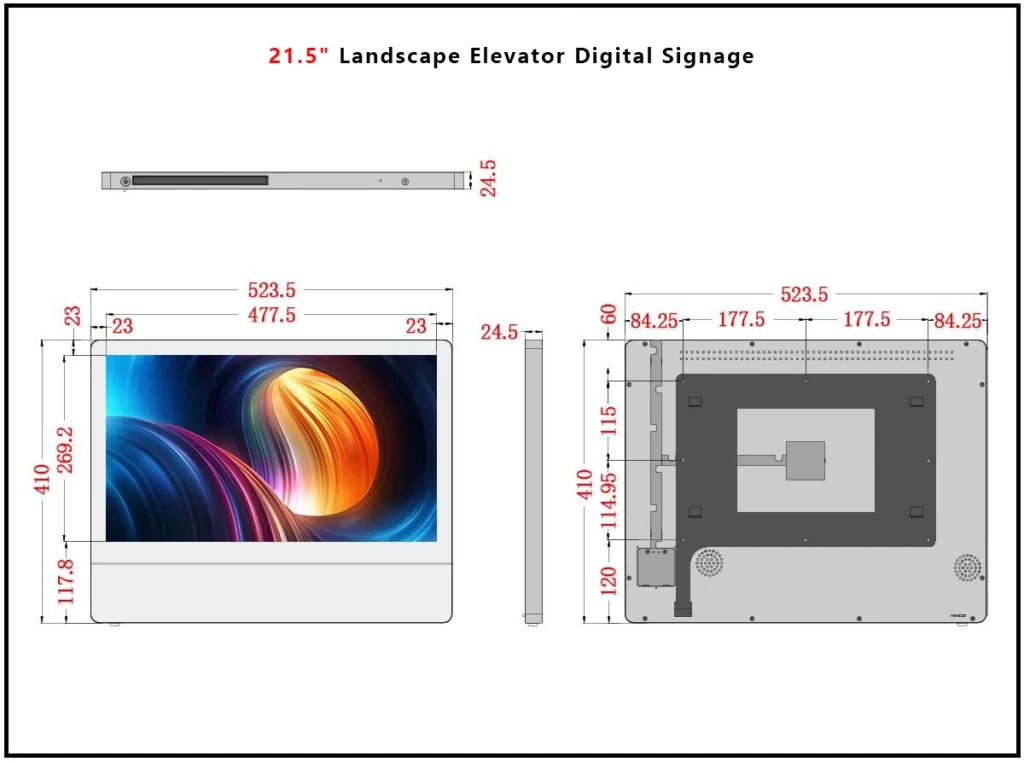
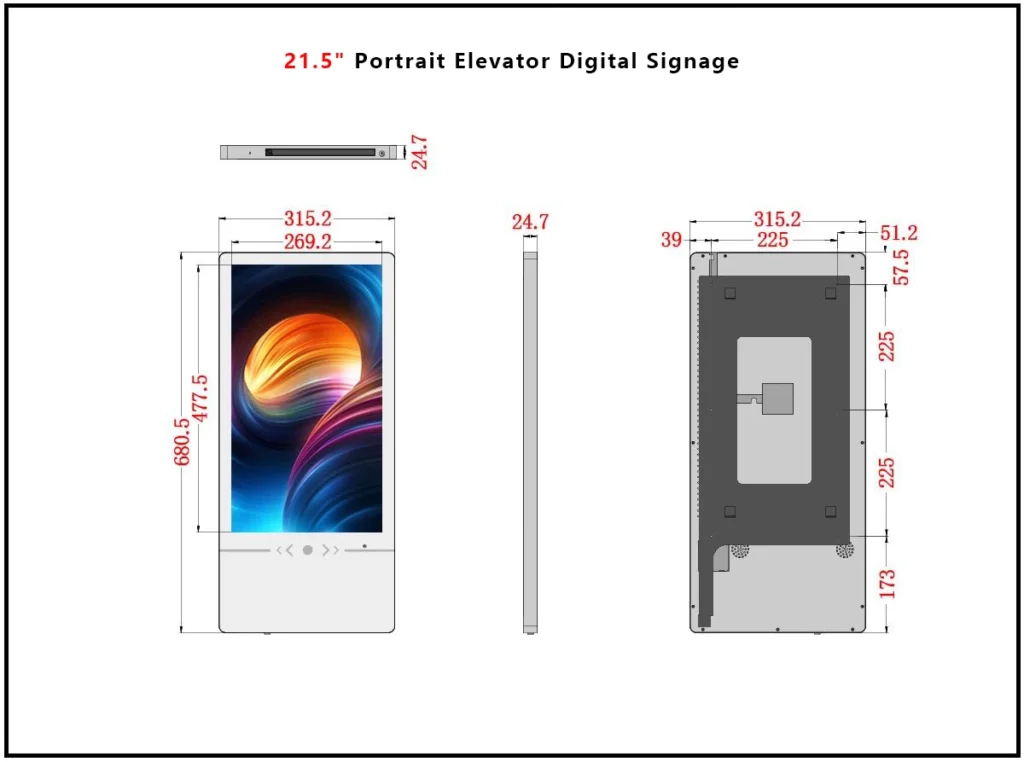
For elevator installations, space, viewing distance, mounting, and content design should be evaluated together.
Can an Elevator LCD Display Use WiFi or 4G?
Yes.
Connectivity is an important consideration when installing digital signage inside elevators.
A commercial elevator display may use:
WiFi
WiFi is useful when a reliable wireless network is available in the building and the elevator location receives sufficient signal.
The main advantage is that no dedicated Ethernet cable needs to be routed to the screen for Internet access.
Ethernet / LAN
A wired network connection can be appropriate when reliable cabling is already available or when the project requires a wired network architecture.
However, elevator cable routing should be evaluated by the appropriate elevator professionals.
4G
4G connectivity can be useful when building WiFi is unavailable, unreliable, or difficult to provision.
An optional 4G module can allow the screen to connect through a cellular network using a SIM card, depending on the hardware and local network compatibility.
For a geographically distributed advertising network, WiFi and 4G can provide more deployment flexibility.
Do You Need an External Media Player?
Not necessarily.
One advantage of an Android elevator digital signage display is that the media player can be integrated into the display itself.
This can simplify the installation because the project may not require a separate external Android box, mini PC, or dedicated signage player.
The integrated architecture can reduce:
- External cable connections
- Additional mounting requirements
- Installation components
- Equipment behind the display
- Potential points of failure
For buyers, however, it is still important to confirm the Android version, RAM, storage, supported media formats, CMS compatibility, and software update policy for the exact display configuration.
Can You Install a Third-Party Android CMS?
Potentially, yes.
Android-based commercial displays can provide greater software flexibility than proprietary signage platforms, but buyers should always confirm compatibility with the specific CMS before ordering.
If your advertising network already uses a CMS such as Kitcast or another Android-compatible signage platform, ask the display manufacturer to confirm:
- Supported Android version
- APK installation capability
- Kiosk mode
- Auto-start after reboot
- Screen orientation
- Offline playback
- Remote device control
- Storage requirements
- API availability
- SDK availability
Adhaiwell can also provide API and SDK support for projects requiring software integration.
This is particularly relevant for advertising networks that want to connect the display hardware with their own advertising management or content platform.
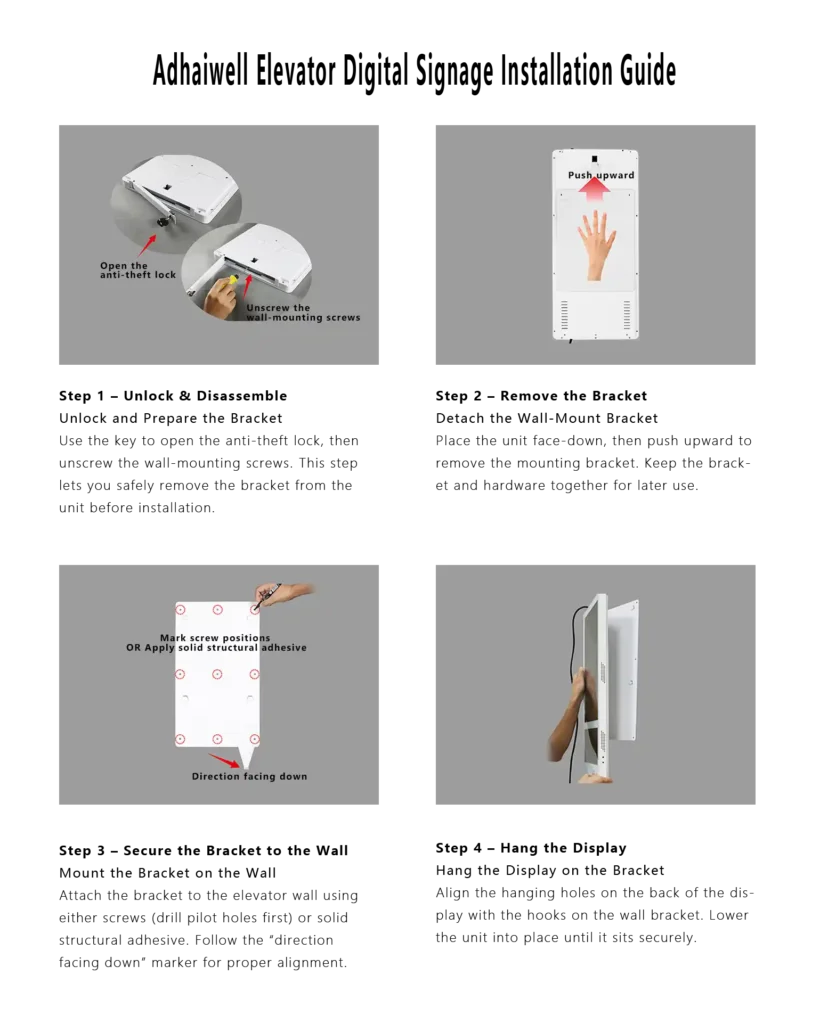
How Should an Elevator LCD Display Be Mounted?
For elevator advertising, mounting is not a minor detail.
The display needs to fit the available wall area while remaining secure and serviceable.
Adhaiwell elevator LCD displays can be configured for wall or surface mounting, with mounting hardware/backplate options depending on the model and project configuration. The product design also includes features such as a security lock and protective tempered glass for public environments.
Before installation, buyers should obtain the actual mounting drawing for the exact model.
The drawing should show:
- Overall dimensions
- Mounting-hole locations
- Mounting depth
- Cable entry location
- Power connection location
- Service access
- Weight
- Recommended mounting method
The final fastening method should be selected according to the elevator wall construction and the requirements of the elevator contractor.
What Should Electricians Check Before Installing an Elevator Display?
An electrician evaluating the installation should confirm the available power supply and the intended connection method.
The supplier should provide the electrical information for the exact display configuration, including:
- Input voltage
- Frequency
- Maximum power consumption
- Current requirements
- Power connector
- Cable requirements
- Power switch or control arrangement
For U.S. projects, buyers should also confirm that the selected configuration is suitable for the local 120V / 60Hz power environment.
Electrical work should be completed by qualified professionals according to applicable local requirements.
Do not assume that the specification of one screen configuration automatically applies to every size or customized version.
What Should Elevator Contractors Check Before Installation?
The elevator contractor should evaluate the physical installation independently of the digital signage supplier.
Important questions include:
- Is there sufficient wall space?
- Is surface mounting permitted?
- Where can the display be installed?
- How will the mounting bracket attach to the elevator wall?
- How will power reach the display?
- Is network connectivity available?
- Is WiFi signal adequate?
- Would 4G be more practical?
- Can the display be serviced without damaging elevator components?
- Does the installation comply with the elevator manufacturer’s requirements and applicable local codes?
A digital signage supplier can provide the display dimensions and mounting drawing, but the elevator contractor should make the final determination regarding elevator installation.
How Can Property Managers Use Elevator Digital Signage?
Elevator displays do not have to be used exclusively for advertising.
Property managers can also use the screens for building communication.
Possible applications include:
- Property announcements
- Community events
- Building notices
- Amenity promotions
- Maintenance notifications
- Local business promotions
- Hotel services
- Tenant communication
- Emergency-related information where the system is properly integrated and approved
This creates a potential value proposition for property owners.
The screen can serve both commercial advertising and building communication rather than functioning as an advertising device alone.
How Can Advertising Networks Use Elevator LCD Displays?
For a DOOH operator, the elevator can become a small digital media location inside a larger advertising network.
A network operator can install screens across multiple residential buildings and manage the content centrally.
The business workflow may look like:
Advertiser
↓
Advertising Network
↓
Campaign / Playlist
↓
Cloud CMS
↓
Building → Elevator → Screen
As the network grows, the operator can standardize screen size, mounting, connectivity, CMS configuration, and maintenance procedures.
This standardization can be more important than selecting the cheapest screen for the first installation.
A pilot should therefore test the complete operating system, not just whether the LCD screen displays an advertisement.
What Features Matter for 24/7 Elevator Digital Signage?
Commercial digital signage is different from a consumer television.
Buyers should evaluate:
- Commercial-grade panel
- Continuous operating capability
- Thermal management
- Stable Android player
- Reliable storage
- Remote management
- Scheduled power control
- Offline playback
- Secure mounting
- Service access
- Warranty support
Adhaiwell’s elevator LCD product line is positioned for commercial operation and includes cooling vents, protective glass, security features, Android-based playback, and network connectivity options.
For long-term deployments, automatic power scheduling can also be useful.
A screen may technically operate continuously, but a network operator can choose scheduled operating hours where the building’s advertising program does not require overnight playback.
This can reduce unnecessary operating time and make device management more predictable.
What Should You Check When Buying an Elevator LCD Display from China?
Price is important, but it should not be the only purchasing criterion.
A professional B2B buyer should evaluate the complete supplier package.
1. Hardware
Ask for the exact:
- Screen size
- Resolution
- Brightness
- Viewing angle
- Dimensions
- Thickness
- Weight
- Panel brand
- Android configuration
- RAM
- Storage
2. Connectivity
Confirm:
- WiFi
- Ethernet
- Optional 4G
- SIM compatibility
- Network configuration
3. CMS
Ask:
- Is the CMS included?
- Is there a recurring license fee?
- Can content be scheduled?
- Can multiple screens be managed?
- Is offline playback supported?
- Can third-party CMS software be installed?
- Are API or SDK resources available?
4. Installation
Request:
- Technical datasheet
- Mounting drawing
- Installation instructions
- Mounting bracket/backplate details
- Cable information
5. Commercial terms
Ask for:
- Unit price
- MOQ
- Sample/pilot price
- Shipping cost
- Packaging
- Warranty
- Spare parts
- Repair procedure
- Lead time
- Volume pricing
- OEM/ODM options
6. Import costs
For U.S. buyers importing from China, the final landed cost may include more than the factory price.
Depending on the shipment and current customs requirements, buyers may need to consider:
- International freight
- Customs clearance
- Duties or tariffs
- Brokerage
- Local delivery
- Installation
Because these costs can change, a supplier quotation should clearly distinguish the product price from shipping and other potential import costs.
How Much Does an Elevator Digital Signage Display Cost?
There is no single price for an elevator advertising display.
The final price depends on:
- Screen size
- Android configuration
- Storage
- Connectivity
- 4G module
- Mounting hardware
- Quantity
- Custom housing
- CMS requirements
- Packaging
- Shipping destination
- OEM/ODM requirements
For a single pilot unit, the unit price may be higher than the price available for a larger network deployment.
For this reason, buyers planning to build an elevator advertising network should tell the manufacturer both the initial pilot quantity and the expected future deployment volume.
This gives the supplier an opportunity to propose a more appropriate long-term pricing structure.
What Should a Supplier Quote Include?
A professional elevator digital signage quotation should ideally identify the exact configuration.
At minimum, ask the supplier to specify:
| Item | What to Confirm |
|---|---|
| Screen | Exact size and model |
| Orientation | Portrait or landscape |
| Resolution | Full HD or other |
| Brightness | Exact value |
| Android | Version |
| RAM / Storage | Exact configuration |
| CMS | Included or licensed |
| WiFi | Included or optional |
| 4G | Optional or included |
| Mounting | Bracket/backplate included? |
| Glass | Tempered/protective glass |
| Security | Lock/tamper protection |
| Power | Voltage and consumption |
| Dimensions | Exact enclosure dimensions |
| Weight | Net/gross weight |
| Warranty | Period and coverage |
| Shipping | Freight to destination |
| Customization | OEM/ODM availability |
This information makes it much easier for an electrician, elevator contractor, IT team, and purchasing department to evaluate the same product.
Where Can Elevator LCD Digital Signage Be Used?
Elevator digital signage is suitable for environments where people spend time inside or near elevators.
Common applications include:
Residential Apartment Buildings
Advertising networks can display local business advertising, community information, events, and property announcements.
Hotels
Hotels can use elevator displays for restaurant promotions, amenities, events, local attractions, and branded content.
Office Buildings
Corporate or commercial buildings can use screens for tenant communication, internal announcements, building information, and advertising.
Shopping Centers
Elevator screens can promote stores, restaurants, events, and services within the property.
Property Management Networks
A property management company operating multiple buildings can potentially standardize the display hardware and manage content centrally.
What Is the Future of Elevator Digital Signage?
The direction of commercial digital signage is moving from individual displays toward managed networks.
The important change is not simply that screens are becoming larger or higher resolution.
It is that screens are increasingly becoming connected endpoints.
For an elevator advertising network, this means the long-term value comes from combining:
Commercial hardware + Android player + Cloud CMS + connectivity + remote management + standardized installation
This architecture can support a network that begins with one pilot display and grows into multiple buildings.
The same trend is visible across broader digital signage: cloud management, local content caching, remote monitoring, scheduling, and Android-based signage players are increasingly common features in managed screen deployments.
The practical lesson for buyers is simple:
Do not evaluate an elevator screen only by its LCD specifications. Evaluate the entire operating system around the screen.
How Should You Start an Elevator Advertising Network?
A pilot installation is often a sensible starting point.
Instead of immediately ordering a large quantity, a network operator can use the first installation to validate:
- Physical fit
- Mounting
- Power connection
- WiFi performance
- 4G alternative
- CMS operation
- Offline playback
- Content quality
- Remote management
- Maintenance access
- Property-owner acceptance
- Advertising workflow
Once these points are validated, the hardware configuration can be standardized for additional elevators.
This approach can reduce the risk of discovering an installation or software problem after dozens of displays have already been purchased.
Why Consider Adhaiwell for Elevator LCD Digital Signage?
Adhaiwell manufactures commercial LCD digital signage and elevator advertising displays in China.
Its elevator LCD product range includes multiple sizes and configurations for elevator cabins, lobbies, hotels, offices, apartments, and other commercial environments. The product platform supports Android-based playback, Cloud CMS, WiFi, LAN, optional 4G, portrait and landscape formats, and OEM/ODM customization depending on configuration.
For B2B buyers, the manufacturer model can be useful when the project requires more than a standard off-the-shelf display.
A buyer can discuss:
- Screen size
- Housing
- Mounting
- Android configuration
- Connectivity
- CMS
- 4G
- API / SDK
- Branding
- OEM/ODM
- Pilot quantity
- Volume purchasing
For an elevator advertising network, the goal should be to select a configuration that works for the first installation and can also be standardized as the network grows.
Elevator LCD Digital Signage Buyer’s Checklist
Before placing an order, ask the supplier these questions:
- What is the exact model number?
- What are the exact screen dimensions and thickness?
- What is the net weight?
- Is portrait mounting supported?
- Is the mounting backplate included?
- Is tempered/protective glass included?
- Is there an anti-theft or security lock?
- What are the exact voltage and power requirements?
- Is the U.S. configuration compatible with 120V/60Hz?
- Is the display designed for commercial continuous operation?
- Does it include WiFi?
- Is 4G available as an option?
- Is the Android player built into the display?
- What Android version does the exact model use?
- Can a third-party Android CMS be installed?
- Is offline playback supported?
- Is Cloud CMS included or subject to a license fee?
- Is API/SDK access available?
- What is the warranty?
- How are warranty repairs handled?
- What are the shipping and import costs?
- What volume pricing is available for future deployments?
For a U.S. elevator advertising project, the technical datasheet and installation drawing should be reviewed by the relevant electrician and elevator contractor before installation.
Frequently Asked Questions
What is an elevator LCD digital signage display?
It is a commercial LCD display designed for elevator advertising, building communication, property information, and other digital signage applications.
What is the advantage of Android elevator signage?
An integrated Android player can eliminate the need for a separate media player and provide flexibility for digital signage applications and compatible third-party CMS software.
Can elevator advertising displays use WiFi?
Yes. Compatible elevator digital signage displays can use built-in WiFi for remote content updates and management.
Can an elevator display use 4G?
Some configurations can include an optional 4G module, which can be useful when building WiFi is unavailable or unreliable.
Can the display work without Internet?
Yes. If content has already been downloaded to local storage, the display can continue playing the stored playlist while the network connection is unavailable.
Is a 21.5-inch elevator display suitable for apartment buildings?
A 21.5-inch portrait display can be a practical choice for many elevator cabins, but the actual screen size should be selected based on the elevator’s available wall space, viewing distance, and installation requirements.
Can I install my own Android CMS?
Potentially. Compatibility should be confirmed with the display manufacturer and CMS provider before deployment.
Does an elevator LCD display need an external media player?
Not necessarily. An Android-based display can integrate the media player directly into the screen.
What should I ask an elevator display manufacturer before ordering?
Ask for the exact technical specification, mounting drawing, electrical requirements, CMS information, connectivity options, warranty, shipping cost, and volume pricing.
Is buying directly from a China elevator LCD manufacturer suitable for a large network?
It can be suitable when the buyer needs OEM/ODM customization, standardized hardware, factory-direct pricing, and long-term volume supply. Buyers should evaluate the manufacturer’s technical support, quality control, warranty process, and ability to maintain the same configuration as the network expands.
Final Takeaway
For an elevator advertising network, the screen is only one part of the solution.
A practical deployment should combine:
Commercial LCD hardware + embedded Android + Cloud CMS + reliable connectivity + offline playback + secure mounting + remote management.
For a first pilot installation, start by confirming the physical dimensions, mounting method, electrical requirements, network connectivity, CMS compatibility, and offline playback behavior.
Once the pilot has been validated, the same configuration can be standardized for additional elevators and buildings.
If you are evaluating an Android elevator LCD digital signage display with Cloud CMS, Adhaiwell can provide the technical configuration, mounting information, OEM/ODM options, and quotation based on your project requirements.
Request the technical datasheet, installation drawing, recommended configuration, and quotation for your elevator digital signage project.